

1
/
of
1
BuildYourCNC
Mach4 CNC Control Software
Mach4 CNC Control Software
1 review
Regular price
$200.00 USD
Regular price
$200.00 USD
Sale price
$200.00 USD
Unit price
/
per
Shipping calculated at checkout.
Couldn't load pickup availability
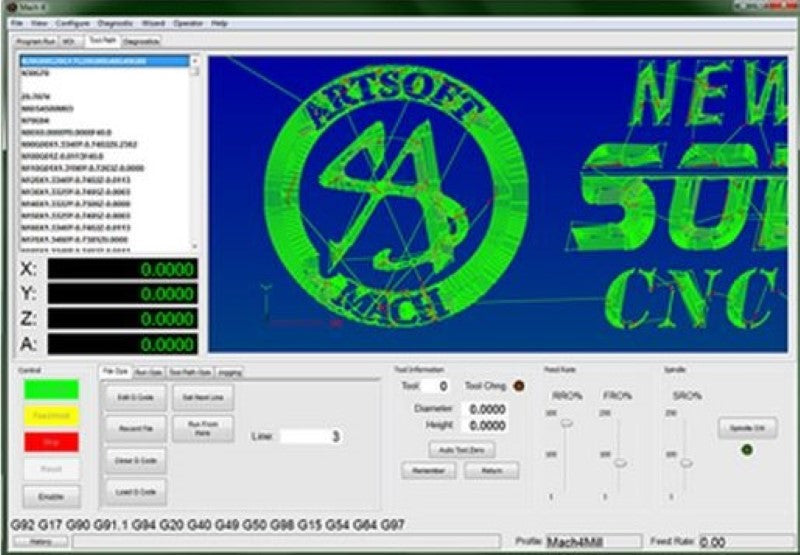
This is the newest software offered by the makers of Mach3. Mach4 will have more features and an entirely new interface. Mach4 will also run on most Windows operating systems. You will be able to run a single license on up to 5 machines simultaneously. Information from the Mach4 webpage: "Mach4 is completely new software and has less than 1% of the programming code in common with Mach3. It was written from the ground up to be expandable, flexible, and extremely responsive for use with very large files on any operating system; including Windows, Apple, and Linux. While there was only one version of Mach3, Mach4 will be offered in different versions (not including the many customized OEM versions)." Download Mach4 Software Note: This is the base Mach4 software. You will need to purchase and install the license to enable the full version of the software (see registration instructions below). If you are using the Pokeys57CNC Controller, download the Mach4 plugin and manuals for this controller. You will not need the legacy parallel port plugin with this controller. New Features on Mach4
- Type C (Fanuc) cutter compensation standard in Mach4.
- More accurate tool path compensation for different size tools
- Improved Anti-gouging
- Synchronous Motion of up to 6 completely separate coordinate systems (instances) at the same time.
- Multiple heads, machines and processes to produce complex parts.
- Asynchronous Motion (out of band axis) to control uncoordinated motion.
- Pre-change tool changers
- Robotic Loaders
- Torch height manual compensation control
- Multi-Axis Work Shifts and Head shifts to offset cutting tool path for multiple work piece holders and fixtures.
- Remote Control of machinery (IPC)
- Control or track CNC equipment from a remote location
- Greatly expanded troubleshooting
- Track the operation of equipment
- Link information between other computer applications Excel, etc
- New Dynamic tool path display
- View, rotate, pan, and scale the tool path quickly and easily to ensure G-code is creating the path you expect.
- Improved screen layout and easily customizable screen modification tool.
- Change buttons, displays, and indicators easily, quickly, and on the fly! Parallel Port Legacy Plug-in: For compatibility with Parallel Breakout Boards, Mach4 requires an additional $25 purchase for the legacy driver to run off the parallel breakout system. Mach4 Industrial Additional Features Tool Life Management (G10 L3 command), Screw Mapping Professional Screen Designer (advanced G.U.I.) - Screen Animation Control - Screen Integrated Tool Table Control - Screen Integrated Work Offset Control - Screen Integrated gcode editor - Screen Artsoft Wizard Package Integration Macro B gcode Programming (#variables) - User definable gcodes via marco calls - Macro Calls: G65, G66, G66.1 - gcode via marco call (custom G codes via macro B) - mcode via macro call (custom M codes via macro B) - mcode via sub code (custom M code via sup program) - Conditional gcodes - set VN call - define variable names gcode Editor Included Phone support with the developer with priority support. Mach4 Registration Instructions:
- Download the demo version of Mach4 Hobby here
- After installation, run Mach4 Mill
- Navigate to "Help" tab on the top menu and select "About"
- Copy your PC-ID number and put it in the order notes when purchasing, or reply to your order confirmation email with it.
- Once we have your PC-ID we will send you the license file that will register your copy of Mach4 and email you the license zip file
- After receiving the file containing your license, save the file into a folder on the same computer you have installed Mach4 on.
- Open Mach4 Mill and navigate to Help and About again.
- Click on "Load License File" and select the license file you have just saved. You will receive a confirmation message that Mach4 is registered and you will be asked to restart your computer.
Share
- 5 stars: 0 (0%)
- 4 stars: 1 (100%)
- 3 stars: 0 (0%)
- 2 stars: 0 (0%)
- 1 star: 0 (0%)
K
Keith Adams Works just fine.
Thanks for the review, Keith. Glad to hear the Mach4 CNC control software is working well for you.