BuildYourCNC
USB to RS485 Converter
USB to RS485 Converter
Couldn't load pickup availability
DTECH USB to RS422/RS485 Serial Adapter Cable - Complete Product Guide
Product Overview
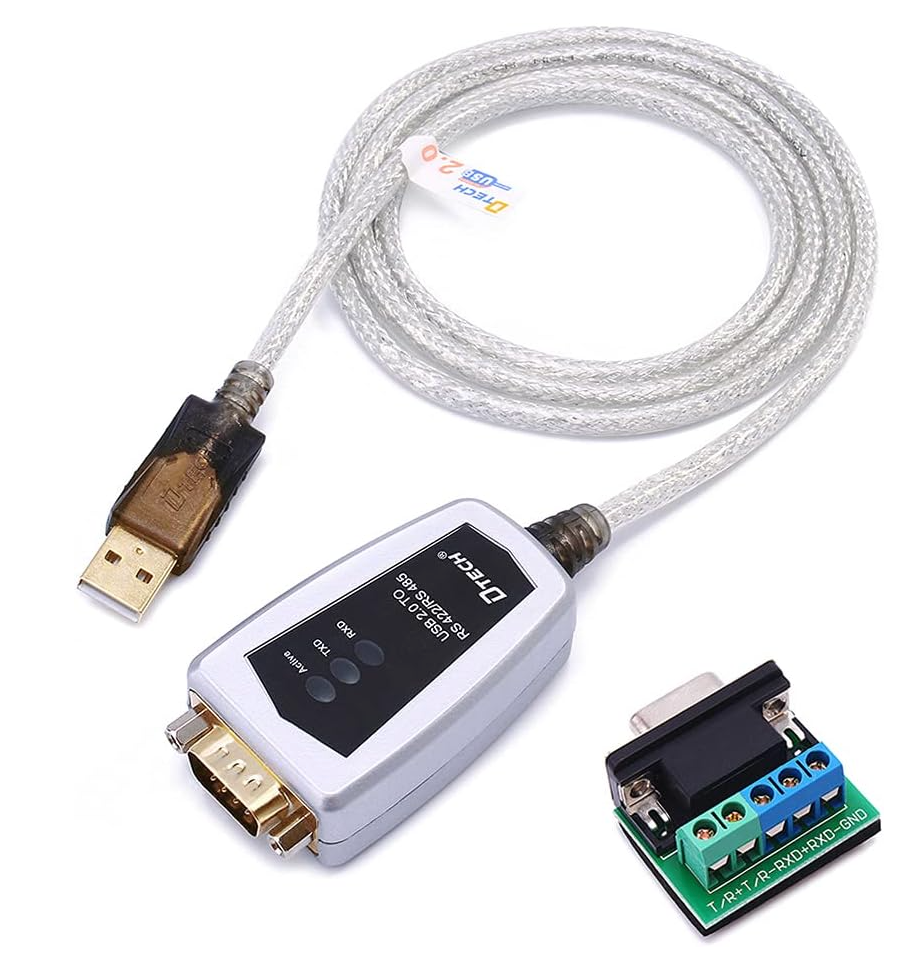
The DTECH USB to RS422/RS485 Serial Port Adapter Cable is a professional-grade industrial communication solution designed to bridge the gap between modern USB-equipped computers and legacy RS422/RS485 serial devices. This adapter is particularly valuable for CNC applications, VFD (Variable Frequency Drive) control, and industrial automation systems where reliable serial communication is critical.
Key Product Details:
- Brand: DTECH
- Model: USB to RS422/RS485 Adapter with Terminal Board
- Cable Length: 4 feet (1.2 meters)
- Chipset: FTDI FT232 (Premium Quality)
- Color: Black
- Dimensions: 8.9 x 5 x 2.1 inches
- Customer Rating: 4.6/5 stars (218 reviews)
Technical Specifications
Communication Standards
- RS485: Half-duplex, 2-wire communication
- RS422: Full-duplex, 4-wire communication
- Compliance: TIA/EIA-485 and TIA/EIA-422 standards
- USB Standard: USB 2.0 (backward compatible with USB 1.1)
Performance Characteristics
- Baud Rate Range: 300 bps to 921,600 bps
- Maximum Distance: Up to 1,200 meters (4,000 feet) for RS485/422
- Device Support: Up to 32 RS485 or RS422 devices on a single network
- Data Transmission: Zero delay automatic transmission
- Auto-detection: Automatic data speed detection
Protection Features
- Surge Protection: 600W surge protection
- ESD Protection: 15KV electrostatic discharge protection
- Signal Isolation: Protects sensitive equipment from electrical damage
- Industrial Grade: Built for harsh industrial environments
CNC and VFD Applications
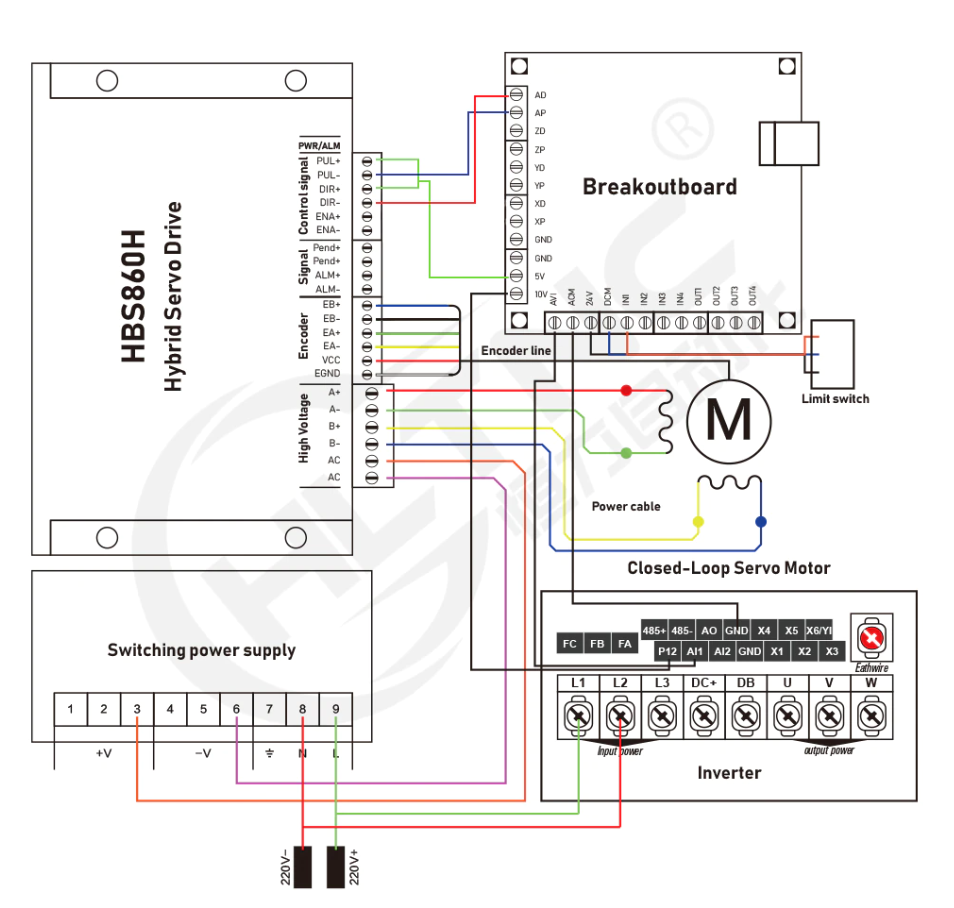
VFD Spindle Control
This adapter is ideal for CNC applications requiring VFD communication:
Spindle Speed Control:
- Connect your CNC controller to VFD units for precise spindle speed control
- Supports Modbus RTU communication protocol commonly used in VFDs
- Enables real-time speed feedback and monitoring
- Compatible with popular VFD brands like Huanyang, YL600, and others
Industrial Automation Applications
- Building Automation Systems: HVAC control, lighting systems, security interfaces
- PLC Communication: Connect PLCs to computer systems for monitoring and control
- SCADA Systems: Data acquisition and supervisory control applications
- Modbus Networks: Support for Modbus RTU protocol communication
- Industrial Sensors: Connect temperature, pressure, and flow sensors
- Material Handling: Conveyor systems, sorting equipment, packaging machinery
Installation and Setup Guide
System Requirements
- Operating Systems: Windows 11, 10, 8, 7, XP, Mac OS, Linux
- USB Port: Available USB 2.0 or higher port
- Driver Support: FTDI drivers (usually auto-installed)
Installation Steps
-
Driver Installation:
- Windows: Drivers typically install automatically via Windows Update
- For manual installation, use the included CD or download latest FTDI drivers
- Mac/Linux: Drivers usually included in modern OS versions
-
Physical Connection:
- Connect the USB end to your computer
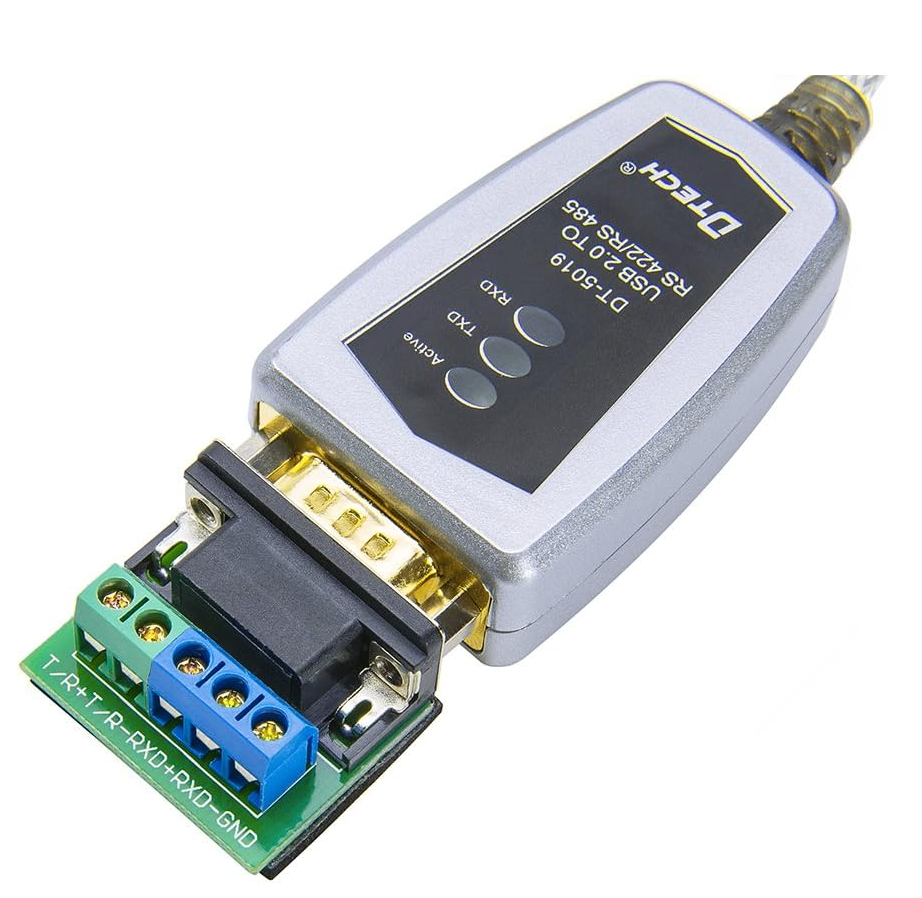
- Wire your RS485/RS422 devices to the terminal board
- Ensure proper cable shielding and grounding
-
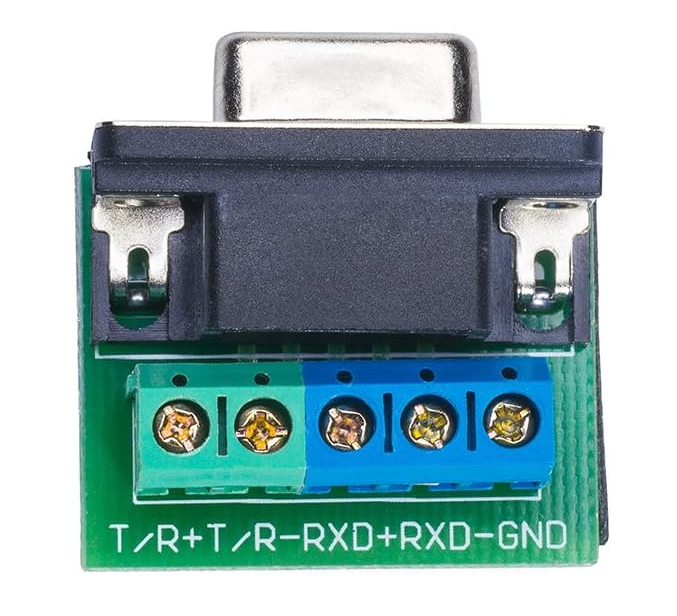
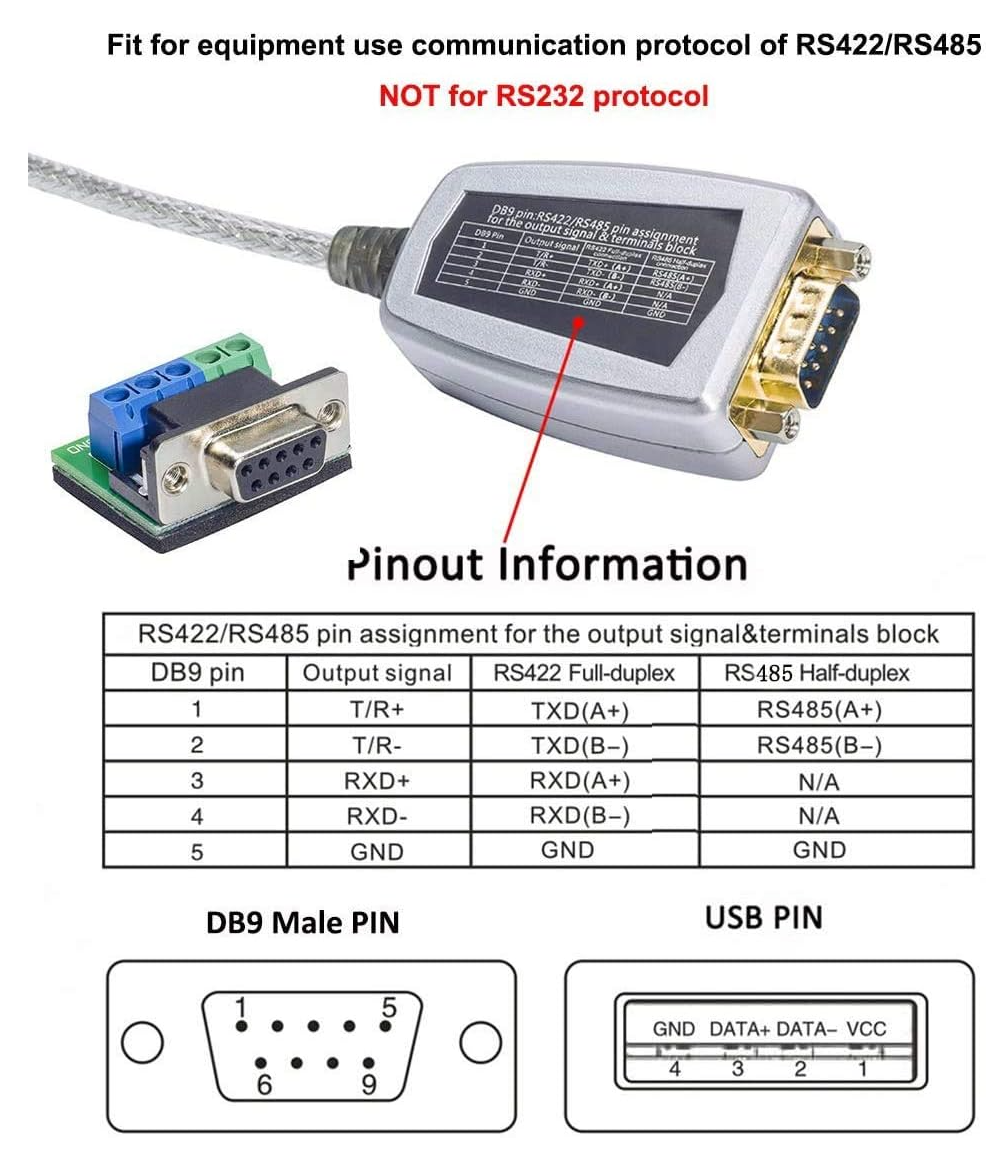
Terminal Board Wiring:
- RS485 (Half-duplex): Use A(+) and B(-) terminals
- RS422 (Full-duplex): Use separate transmit and receive pairs
- Ground: Connect signal ground for proper operation
Wiring Configurations
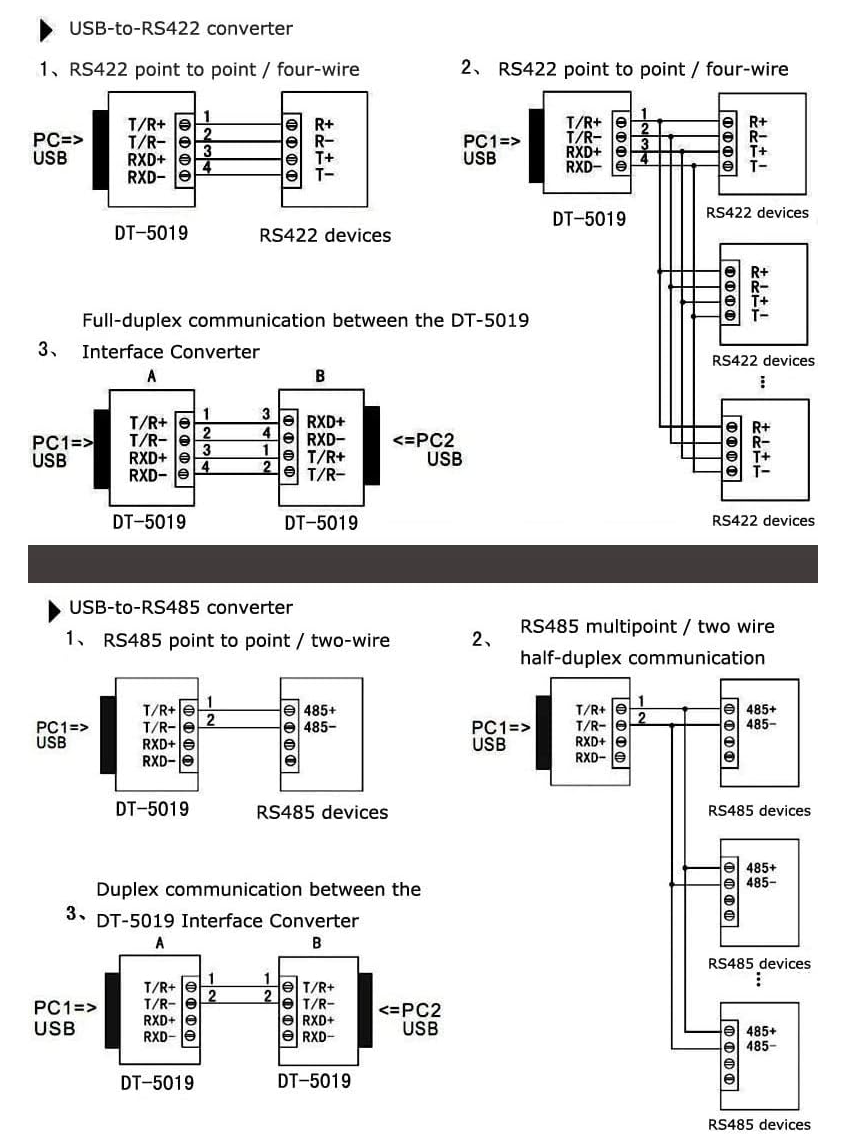
RS485 Two-Wire Configuration:
- Terminal A(+) → Device A(+) or Data+
- Terminal B(-) → Device B(-) or Data-
- Ground → Signal ground (recommended)
RS422 Four-Wire Configuration:
- TX+ → Device RX+
- TX- → Device RX-
- RX+ → Device TX+
- RX- → Device TX-
- Ground → Signal ground
Software Configuration
COM Port Settings
Once installed, the adapter appears as a standard COM port in your system:
- Baud Rate: Match your device requirements (common: 9600, 19200, 38400, 115200)
- Data Bits: Typically 8
- Parity: Usually None or Even
- Stop Bits: Usually 1
- Flow Control: Hardware or None
CNC Software Integration
Most CNC software packages support serial communication:
- Mach3/Mach4: Configure as standard COM port
- LinuxCNC: Use as serial device
- GRBL: Compatible with GRBL-based controllers
- Custom Applications: Use standard serial communication libraries
Troubleshooting Guide
Common Issues and Solutions
Device Not Recognized:
- Check USB cable connection
- Verify driver installation
- Try different USB port
- Check Device Manager for COM port assignment
Communication Errors:
- Verify baud rate settings match between devices
- Check wiring connections and polarity
- Ensure proper grounding
- Verify RS485/RS422 mode selection
Intermittent Connection:
- Check cable integrity
- Verify power supply to connected devices
- Ensure cables are within distance specifications
- Check for electrical interference
Performance Optimization:
- Use shielded cables for long runs
- Implement proper cable termination
- Ensure adequate power supply for all devices
- Consider using repeaters for very long distances
Advanced Features
Automatic Data Flow Control
- Auto-direction Control: Automatically switches between transmit and receive modes
- Zero Delay: Minimal latency for real-time applications
- Collision Detection: Prevents data collisions in multi-device networks
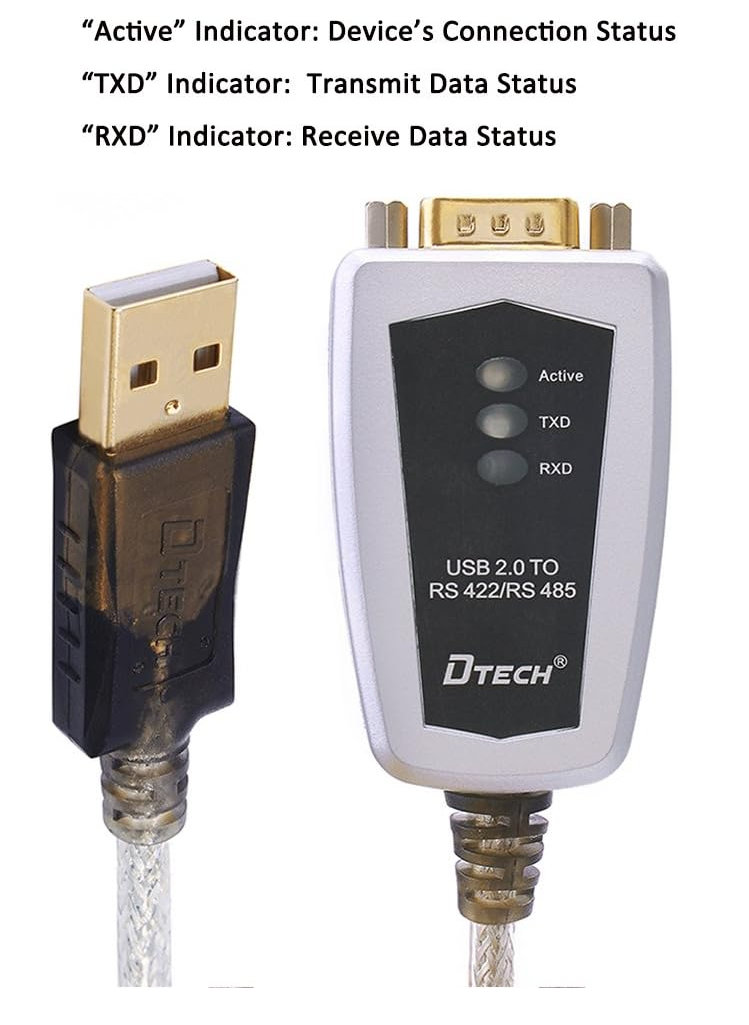
LED Indicators
- Power LED: Indicates USB power and device status
- TX LED: Shows data transmission activity
- RX LED: Shows data reception activity
Maintenance and Best Practices
Installation Best Practices
- Always use proper cable management and strain relief
- Implement adequate grounding systems
- Use appropriate cable gauge for current requirements
- Follow manufacturer's distance and load specifications
Maintenance Tips
- Regularly inspect connections for corrosion or damage
- Keep terminals clean and free from debris
- Monitor LED indicators for proper operation
- Update drivers periodically for optimal performance
Safety Considerations
- Always disconnect power before making wiring changes
- Use appropriate personal protective equipment
- Follow local electrical codes and regulations
- Ensure proper equipment grounding
Additional Requirements (Not Included):
- Appropriate serial cables for your devices
- Terminal screwdrivers for connections
The DTECH USB to RS422/RS485 Serial Adapter represents an excellent value for CNC operators, industrial automation professionals, and electronics enthusiasts who need reliable serial communication. Its robust construction, comprehensive protection features, and broad compatibility make it suitable for both hobby and professional applications.
Whether you're controlling a VFD spindle, interfacing with industrial sensors, or building a custom automation system, this adapter provides the reliable communication bridge between modern computers and industrial serial devices.
Share